Showing posts with label Apple IPhone Tips. Show all posts

Unlock iOS 5.1.1 Baseband 4.12.01 / 4.11.08 — SAM and Redsnow [Video]

Unlock iOS 5.1.1 Baseband 4.12.01 / 4.11.08 — SAM and Redsnow [Video
]

Have you been one of those users who want to update their device to iOS 5.1.1 firmware but afraid that you'll lose your SAM unlock?
Today we have good news for all SAM unlockers, don't worry as we have updated redsnow tool that allows you to safely restore your SAM unlock activation tickets to unlock your iPhone with any baseband on the

Yesterday the Dev Team mentioned inside the release notes that "now you can include your backed-up SAM unlock tickets in your initial ramdisk jailbreak of iPhone 4 or earlier, or on the other hand, you are able to upload your SAM unlock tickets to any device after its already been jailbroken."
The most popular jailbreaking software — Redsnow continues to be a most important tool. After latest update Redsn0w 0.9.12b1 can now jailbreak all devices on iOS 5.1.1, however, the a very important factor most of you'll be thinking about will be the ability to restore your SAM unlock tickets.


How to Unlock your iPhone on any Baseband Using Redsnow


The following tutorial will work on all iOS 5.1.1 devices with any baseband including 4.11.08 and 4.12.01 and for all users who had unlocked their iPhone through the SAM unlock tool that was opened just for a few days before Apple fixed it.


Your [COLOR="Plum"]device need to be jailbroken on the iOS 5.1.1 firmware, since this can transfer the SAM unlock files. You had been also necessary to backup your SAM unlock ticket for future unlock.[/COLOR


[CENTER]Step 1: Download Redsn0w 0.9.12b

Step 2: Now connect your iPhone to your computer and start Redsnow.


Step 3: Now Click Extras -> Even more -> Tickets and choose your Lockdown.zip file that is created when you backed-up your SAM unlock activation ticket. In the event you backed-up your tickets manually you can choose the .plist file.
[/CENTER


[Step 4: You need to get a confirmation message from RedSn0w stating that your Tickets are uploaded.
Step 5: Now reboot your iphone, and test your unofficial Sim card.
Now you've successfully unlocked your device using Redsn0w.
Feel free to ask any questions in the comment section below[/FOT[/COLOR[/CENTER
How to Unlock iPhone 4 / 3GS With Redsn0w 0.9.11b4 Ultrasnow Fixer On iOS 5.1.1 Custom Firmware

Upon its release a few days ago, iOS 5.1.1 hackers already provided a tethered jailbreak for A4 processor devices such as the iPhone 4 and iPhone 3GS. Of course, many iPhone 4 or iPhone 3GS owners want to perform the update from iOS 5.0.1. However, users need to rely on an unlock, keep the iPone baseband version for a future unlock with UltraSn0w or Gevey. To accomplish this process and alter the baseband firmware does not need an update is performed using a custom firmware.The program can redsn0w the appropriate firmware to be created.
Be provided after the installation of the created custom firmware your device has, of course, with a jailbreak.Currently, a tethered jailbreak using redsn0w be performed.The corresponding instructions can be viewed via the link below.
Important Information:
Basically you have to guarantee that the old baseband version is retained when you update to iOS 5.1.1, then, continue to apply to the particular unlock method.This of course applies to all Gevey users, but also for the numerous UltraSn0w users.Therefore you must never perform an update via iTunes, because otherwise the updated baseband version and can not subsequently be screwed down.
Guide to a custom firmware with RedSn0w (Mac or Windows) to create:
  Jailbreak-5.1.1-Using-RedSn0w-0.9.11b4
Download iOS 5.1.1:
Download redsn0w 0.9.11b4 for Windows and Mac OS X:
Step 1:After you install the latest version of redsn0w linked and the corresponding iOS 5.0.1 firmware.
Step 2:
Open RedSn0w 0.9.11b4 and click on "Tools" -> "Custom IPSW".Then select the previously downloaded from iOS 5.1.1 firmware.
Jailbreak-5.1.1-Using-RedSn0w-0.9.11b4-2

Step 3:
Then, the corresponding custom firmware created.Then you will be returned to the "Tools" menu of redsn0w and "Pwned DFU" button.
Step 4:
Put your device into DFU mode and RedSn0w  will automatically go in DFU Pwned clock mode.
Step 5:
Close RedSn0w opens iTunes and your iPhone is detected in maintenance mode.
Step 6:
After you have the Alt key (Windows) or Shift-click (Mac) and clicking on Restore.After you choose the custom firmware created in step 3 from.
Step 7:
At the end you will see on your iPhone and your iOS 5.1.1 baseband version has not changed.This will allow you to free your iPhone with UltraSn0w Fixer patch or with the help of the Gevey SIM card from a SIM lock.
Important Information:
This is not to jailbreak and you keep only your baseband version for later unlock.The jailbreak must then be explicitly performed with redsn0w.You can provide appropriate tutorial to have your iOS devices jailbroken.
Instructions for unlocking the Ultrasn0w Fixer patch:

The following baseband versions are supported:
  • 01:59:00
  • 04:26:08
  • 05:11:07
  • 05:12:01
  • 05:13:04
  • 06:15:00
Step 1:After the custom firmware and the associated jailbreak was installed on the device, Cydia will be opened.Then click on the "Manage" button and open the "Sources".Tap on the "Edit" button and then click on the "Add" button. 
Step 2:
The following URL will be "http://repo.iparelhos.com" must be entered and added afterwards.
Step 3:After adding, click on the repository and the package "Snow Ultra-fixer," and then select install.
Step 4:
After install the installtion of the "Ultrasn0w fixer" must "Ultrasn0w 1.2.5" from the iPhone Dev-Team.This requires the source "http://repo666.ultrasn0w.com" be added.After that you can either search for "Ultrasn0w" or view the source of the tap all packages.
Step 7:
Now carry only a reboot and the unlock work on iOS 5.1.1 with old baseband should.

source

iOS 5 Baseband 4.11.08 iPhone 4 Unlock

Unlock iphone 4 baseband 4.11.08With the new iOS 5 update on the baseband 4.11.08 released, numerous iphone users are looking forward to unlock their iPhone 4 on different carriers. To begin, let's take a look at the basics on unlocking the Apple iPhone. As far as we know, there are only two types of software  that can be unlocked  the iPhone baseband 1.59.00,with Ultrasnow 1.2.4 and Gevey SIM.

As a reminder, your devices have to be jailbroken, you can find the latest tutorial on how to jaailbreak your iPhone, iPod touch and iPad with either Ac1dsn0w or Redsn0w 0.9.9b8. Both jailbreak are tethered.

However, the iPhone users with baseband 01.10.01, 03.10.01, and 02.10.04  were unable to unlock the devices. Some users lost their unlock by updating to the new iOS 5 , causing their iPhone baseband to be upgrade to version 4.11.08. Now the questions is: " Is there anyway to unlock the iPhone 4 baseband 4.11.08 ?"
THe answer to that question is NO, unless the iPhone is downgraded from 4.11.08 to 4.10.01. We have a post showing how to downgrade iOS 5.0.1 to 4.3.5 / 4.3.3 on iPhone 4 / 3GS, iPod touch and the iPad 2 /1, then yu can use Geyey SIM or Ultrasn0w 1.2.4F to unlock your iPhone 4. Unfortunely this unlock methos will not work if you are on iOS 5, 5.1, 5.0.1.
Although you have to save your SHSH blogs before attemping any modification on your devices, since Apple stopped signing previous iOS firmware (meaning you can only update/downgrade to the current iOS firmware) and by saving your SHSH blobs with TinyUmbrella, it does not neceesaryly means you can downgrade your iPhone, iPod touch or iPad.
 For now, stay away from iOS firmware 5 if you want to keep your unlock, once you upgrade your baseband to 4.11.08, there is nothing you can do to downgrade to baseband 4.10.01, developers always working on a software to unlock the iPhone unless your use the two methos mentions above.

source

How To: Jailbreak iPhone 4, iPhone 3GS Untethered On iOS 5.0.1 Using RedSn0w 0.9.10b1 [Windows]

The time has finally come when Pod2G’s Untethered exploit has been worked into a public Jailbreaking solution dubbed RedSn0w 0.9.10b1. In this specific how to guide from iJailbreak.com you will learn how to Jailbreak the iPhone 4 or iPhone 3GS untethered running iOS 5.0.1 using RedSn0w 0.9.10b1 on Windows.
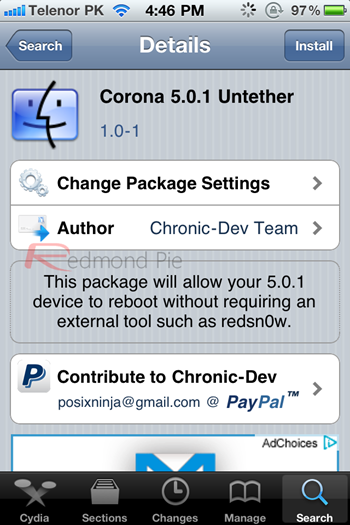
Note #1: If you are already Jailbroken tethered on the iOS 5.0.1 firmware you may want to use the Corona 5.0.1 Untether Cydia package instead. More information is available here.
Note #2: This is not the iPhone 4S Untethered Jailbreak

How To Use RedSn0w 0.9.10b1

Step 1) – Download RedSn0w 0.9.10b1 for the Windows operating system using the download mirror below or through the iJailbreak Downloads Section.
Download RedSn0w 0.9.10b1 (Windows)
Download RedSn0w 0.9.10b2 (Windows)
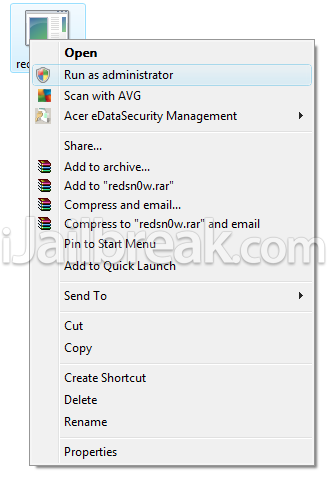
Step 2) - Once you have downloaded RedSn0w you will need to launch it by first right clicking on the RedSn0w.exe file and clicking the Run as Administrator option.
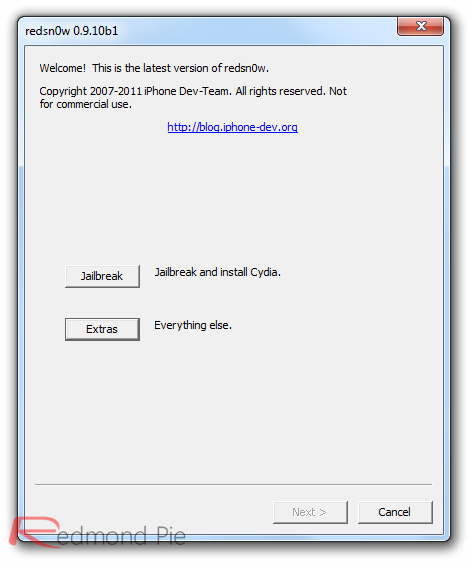
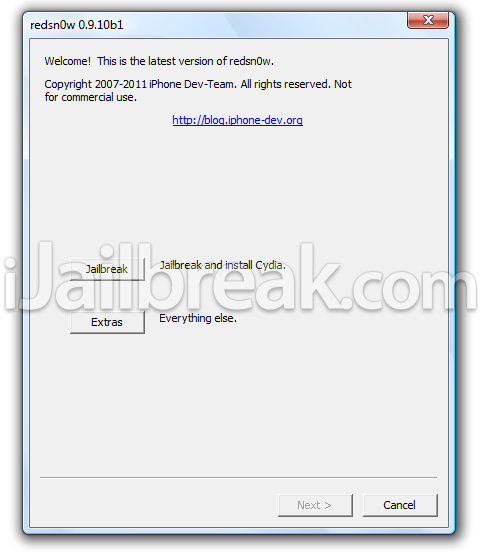
Step 3) – With RedSn0w running you will need to click the Jailbreak button.
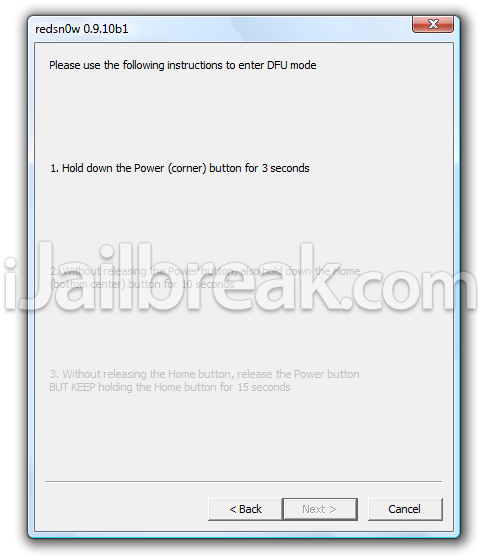
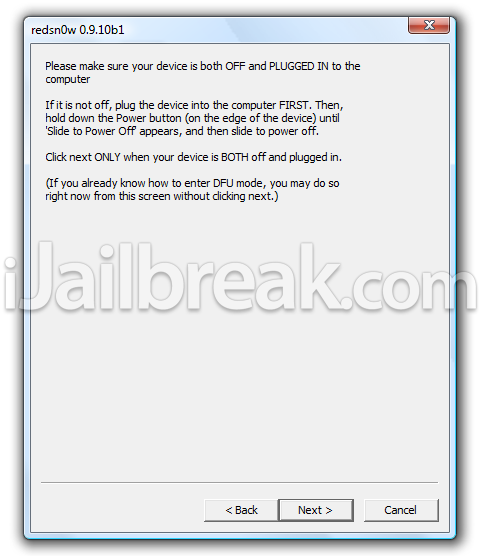
Step 4) – After clicking the Jailbreak button you will come to a screen where you will need to put your iPhone into DFU mode. Read through and follow the instructions presented to you which is to plug in and power off your iPhone and click then next button when you are ready to begin the DFU mode process.
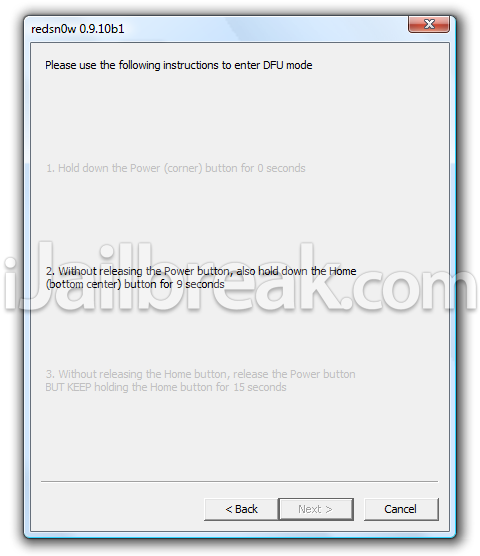
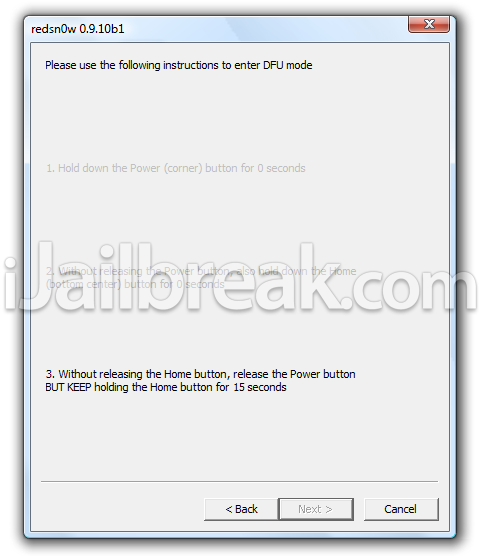
Step 5) – When you click the next button you will need to follow the instructions presented to you in real-time to put your iPhone into DFU mode.
  • Hold down Power (corner) button for 5 seconds.
  • Without releasing the Power button, also hold down the Home (bottom center) button along with the Power button for 10 seconds.
  • Without releasing the home button, stop holding down the power button for up to 15 seconds.
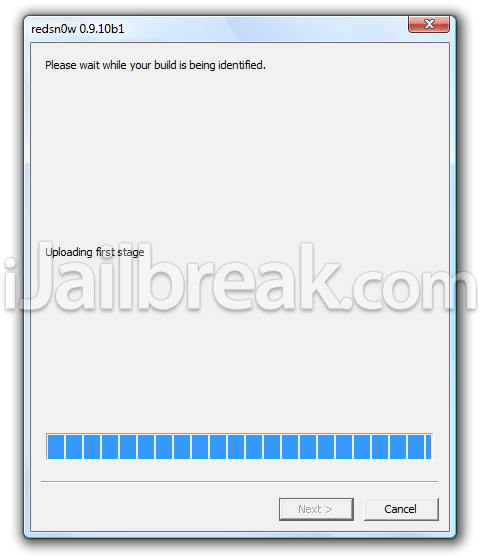
Step 6) – After you successfully enter DFU mode RedSn0w will begin preparing your iPhone for the iOS 5.0.1 Untethered Jailbreak.
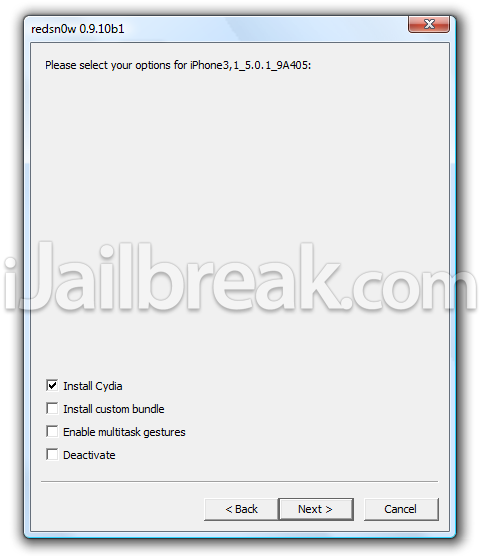
Step 7) - Once RedSn0w has finished preparing your iPhone for the iOS 5.0.1 Untethered Jailbreak you will be asked you to specify options to go along with your Jailbreak. If you are simply re-jailbreaking your iPhone that is running the iOS 5.0.1 firmware jailbroken tethered then you will want to uncheck the install Cydia option. On the flip side, if this is your first time Jailbreaking your iPhone running the iOS 5.0.1 firmware then you will want to make sure you have the install Cydia option checked.
Step 8 ) - After you have specified your Jailbreak options you can click the next button and RedSn0w 0.9.10b1 will begin jailbreaking your iPhone. DO NOT interrupt or use the computer during this time. When your iPhone is finished being jailbroken it will reboot into an untethered state.
Step 9) – To ensure that this iOS 5.0.1 Untethered Jailbreak worked you will need to power off your iPhone and then power on your iPhone and wait for it to reboot itself. If your iPhone reboots into a usable state then this Untethered iOS 5.0.1 Jailbreak worked!
Troubleshooting: If you are having troubles using RedSn0w 0.9.10b1 to Jailbreak your iPhone Untethered on the iOS 5.0.1 firmware, we suggest you try the PwnageTool 5.0.1 or restore to the iOS 5.0.1 firmware and try Jailbreaking your iPhone fresh using RedSn0w 0.9.10b1 again.
You should now have a untethered jailbreak on your iPhone 4, 3GS running iOS 5.0.1. For more tutorials visit the How To Jailbreak Section. Leave any questions in the comments below.

source
http://www.ijailbreak.com/how-to/jailbreak-iphone-with-redsn0w-0-9-10b1-untethered-on-ios-5-0-1-windows/

Jailbreak iOS 5.0.1 Untethered On iPhone, iPad, iPod touch (A4 Devices) Now Using Redsn0w 0.9.10b1 / Corona [Video Tutorial]

It has been nearly eight weeks since the first declaration by pod2g that he had found a bug that he believed could provide an untethered jailbreak for iOS 5. We find ourselves exactly fifty days down the line, and what I imagine has been a lot of sleepless nights for the developers involved, but we now officially have the release of an untethered jailbreak for all A4 devices running iOS 5.0.1.
iOS-5.0.1-WM
On December 22nd, pod2g announced via his official blog that would be passing all of his work and details across to the researchers at the Chronic Development Team partly to allow him to concentrate on progressing the development of an A5 jailbreak, and partly because he believed that the Chronic Dev Team could integrate and package all of his work into a distributable jailbreak.
It seems that his instincts were correct as only five days after that decision was made, we are seeing a release of a jailbreak for A4 devices on iOS 5.0.1 which has been implemented by both the Chronic Dev  and iPhone Dev teams.
The iOS 5.0.1 untethered jailbreak contains the exact same set of files that pod2g provided to the Chronic Dev Team, and can be distributed as either a download via Cydia by searching for a package named ‘Corona’, for users who are already jailbroken tethered, or through a Redsn0w bundle for users who have running stock iOS and have been waiting for this untether.
At the time of writing, it is worth noting that this jailbreak currently only supports iOS 5.0.1 with Chronic Dev Team member p0sixninja tweeting out that 5.0 will follow soon after a number of small bugs have been eradicated and more testing has been carried out. Pod2g has also released some advice to A4 and A5 users advising not to update their devices to iOS 5.0.2 or 5.1 when released as this would cut their chance of a future jailbreak.
Note: The jailbreak released is supported on all A4 based (and below) devices like iPhone 4, 3GS, iPod touch 3G/4G and iPad 1. Newer A5-based devices like iPad 2 and iPhone 4S are currently not supported.
For Users On iOS 5.0.1 Tethered Jailbreak:
If you are currently operating an A4 device which has a tethered jailbreak using Redsn0w, Ac1dSn0w or Sn0wbreeze then you can simply launch Cydia from your Springboard and download a package named ‘Corona’ which will provide you with an untethered jailbreak.
photo (2)
For Users On Stock iOS 5.0.1:
If your device is running stock iOS 5.0.1 then you can use download the latest Redsn0w 0.9.10b1 to for either Windows or Mac to give yourself an untethered jailbreak, instructions for which can be found below.
untetheredJB501
Step 1: Download the latest version of Redsn0w from the links given above.
Step 2: Start Redsn0w, select "Jailbreak" then check "Install Cydia". Follow the onscreen steps to place your device into DFU mode.
Step 3: Wait for Redsn0w to apply the full untethered jailbreak!
Once done, your iPhone, iPad or iPod touch will be rebooted into fully untethered jailbreak mode!
Jailbreak iOS 5.0.1
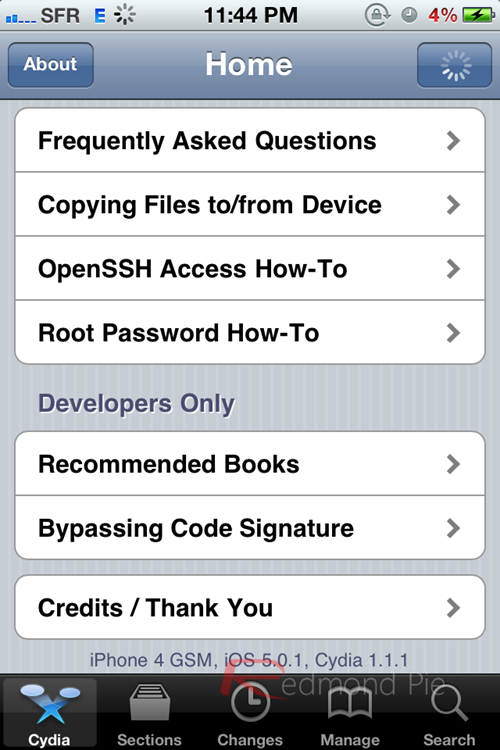
iPhone 4 GSM, jailbroken on iOS 5.0.1
For Users Who Rely On Unlock:
For those of you who rely on Ultrasn0w or Gevey SIM unlock must preserve the old baseband using “Custom IPSW” option found in Redsn0w.


source
http://www.redmondpie.com/jailbreak-5.0.1-untethered-on-iphone-ipad-ipod-touch-a4-devices-now-using-redsn0w-0.9.10b1-corona/